OneTouch Blackjack Perfect Pairs Review — A Side Bet Worth Exploring
Many casino software providers claim that their products work well on mobile. However, our experts know that this isn’t always the case. Porting a desktop version of a game to have it work on a smartphone is nothing like adopting a mobile-first approach from the get-go.
If you’re searching for a table game that is purpose-built for touchscreens, you have to try OneTouch’s “Blackjack Perfect Pairs.” Our online review will show you where to play this excellent release while also discussing its rules, payouts, and special features.


OneTouch Blackjack Perfect Pairs: The Rules You Need to Know
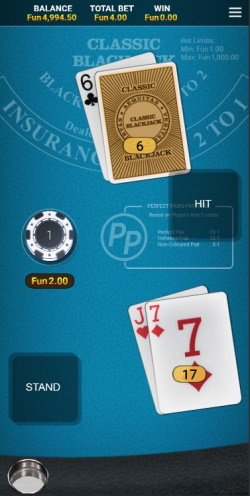
We’ll jump right into detailing important regulations on how the dealer plays, what you’re allowed to do with splits and doubles, and other “must-know” facts. If you don’t know the basics of blackjack, we advise you to check out the “rules” page on this website. Let’s begin:
Dealer & Card Rules
- Eight standard decks (jokers excluded) are in play. One deck contains 52 cards, so you have 416 of them in total.
- Card counting isn’t possible in Blackjack Perfect Pairs by OneTouch since the playing shoe is shuffled between rounds.
- The croupier must draw until 16. They will stand on a hard 17 but hit soft ones.
- Peeks occur when the dealer’s up-card has a 10-point value or is an ace. In the latter case, you’ll be offered the insurance bet.
- Some casinos offer a multi-hand variant of this release, but the standard game doesn’t have this feature.
Double Down Details
- You can double when you have a 2-card hand with a value of 9, 10, or 11.
- Double downs also work on split hands.
Split Rules
- Any two cards of equal value can be divided to create new hands. Doing so will double your wager.
- OneTouch’s Blackjack Perfect Pairs rules permit up to three re-splits. However, you can’t re-split aces.
- Hitting splits is okay, except when you divide aces. The latter receive only one additional card.
The Side Bet
- You have the option of placing a side bet called “Perfect Pairs”(PP).
- PP is like a game within a game. It pays out when your first two cards form a pair of different-colored cards (5:1), a pair with suits of the same color (12:1) or are completely identical (25:1).
- Your payout is granted immediately, meaning that you can use the winnings to cover your splits or double downs.
How to Play OneTouch Blackjack Perfect Pairs Online for Free
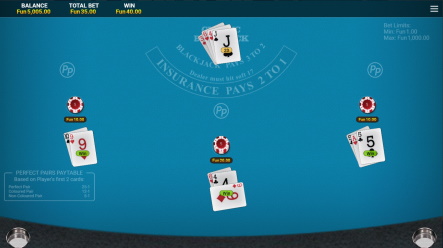
This part of our One Touch Blackjack Perfect Pairs review is for those of you who want to try the game without risking their hard-earned cash. We’ll show you how to quickly find a demo and give you a breakdown of the different buttons and options at your disposal.
- The gaming sites at the top of our review all feature free-to-play modes of this product. Pick one, create a free account, and use the “search by provider” filters under the “casino” category to locate OneTouch.
- Find One Touch Blackjack Perfect Pairs online and start playing its demo. The loading time should take 2-3 seconds at most.
- It’s time to discuss the different areas of interest. Their position changes depending on what device you’re using and the orientation of your screen. We’ll assume that you’re using your phone in portrait mode.
- The playing chips are beneath the “Perfect Pairs” paytable. You can switch between denominations with the arrow keys. Place your wagers by tapping on the circular area on the left. You can also activate the side bet with a tap on the right circle.
- Two squares will appear. “Clear” removes your stakes while “Deal” starts the game.
- To minimize the house edge in Blackjack Perfect Pairs by One Touch, you need to apply an approach called “basic strategy.” If you’re unfamiliar with this term, visit the “strategy” page on our website.
If the title runs too fast or slow for you, try adjusting the speed of card-dealing animations from the arrow keys at the bottom-left side. The mute toggle and the settings menu are also located in this area.
Examining the Paytable and House Edge
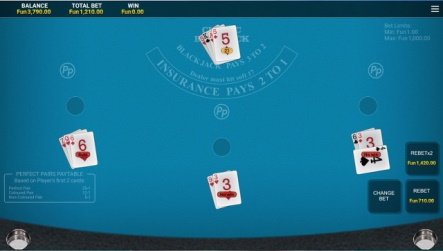
According to official data from OneTouch, this product has an RTP rate of 99.32% or a house edge of 0.68%. This means that you’re expected to lose $0.68 for every $100 you bet over the long run, but only if you stick to basic strategy. Of course, the outcome of your first, second, or 500th play session may differ drastically due to the game’s variance, which is why people are willing to go against the odds.
OneTouch Blackjack Perfect Pairs rules outline a pretty straightforward paytable. Winning with a non-blackjack hand is paid 1:1 while scoring a natural 21 gets a 3:2 payout. We already mentioned the rewards of “Perfect Pairs,” so we’ll only state the bet’s house edge — 4.10%. As usual, taking insurance costs 50% of the bet you’ve placed and covers it only if the dealer scores a blackjack, so it’s best to skip this option.
Blackjack Perfect Pairs by OneTouch Has Some Awesome Features
As a mobile-first product, this blackjack comes with some nifty functionalities. To access them, all you need to do is tap on the three-line menu at the top-right corner. With “Game Rules,” you can catch up on the details that we’ve discussed so far. The “Settings” tab allows you to toggle animations, sounds, tips, and vibrations on and off. Additionally, you can change the table’s color, your default chip size and enable left-hand mode if needed.
There are two other useful features left by OneTouch. Blackjack Perfect Pairs online is available in 12 languages that you can switch at will. Also, there’s a “provably fair” menu that shows you that the results produced by the RNG engine are truly random.
In Conclusion
If you wish to have first-rate gaming sessions on your phone, we highly recommend trying this OneTouch title. It’s feature-rich and has a nice design, its $1-$1,000 betting limits are quite wide, and packs a popular side bet with a reasonable house edge. Granted, it would have been best if the dealer didn’t hit soft 17s, but the overall returns are more than adequate.
This concludes our OneTouch Blackjack Perfect Pairs review. You’re welcome to try the game for free or stake real money on it by visiting one of the approved casinos on our list. Remember to play responsibly and check out the bonus sections for good deals if you decide to deposit.
Other Types of Blackjack Games